
Learn How to Stake Your G$ on Ubeswap Using GoodWallet! 

Looking to grow your G$ and support the GoodDollar ecosystem at the same time?
We’ve created a step-by-step guide just for you! 
In this guide, you’ll learn how to:
 Connect your GoodWallet
Stake your G$ tokens on Ubeswap
Earn rewards while supporting G$
This guide is beginner-friendly and perfect for any G$ claimer or supporter who wants to make their G$ work for them.
Step 1: Navigate to the Ubeswap GoodStaking site: Ubeswap Interface
Step 2: Tap on Connect Wallet and Select Walletconnect.

Step 3: Tap on the barcode icon and copy the QR code link:
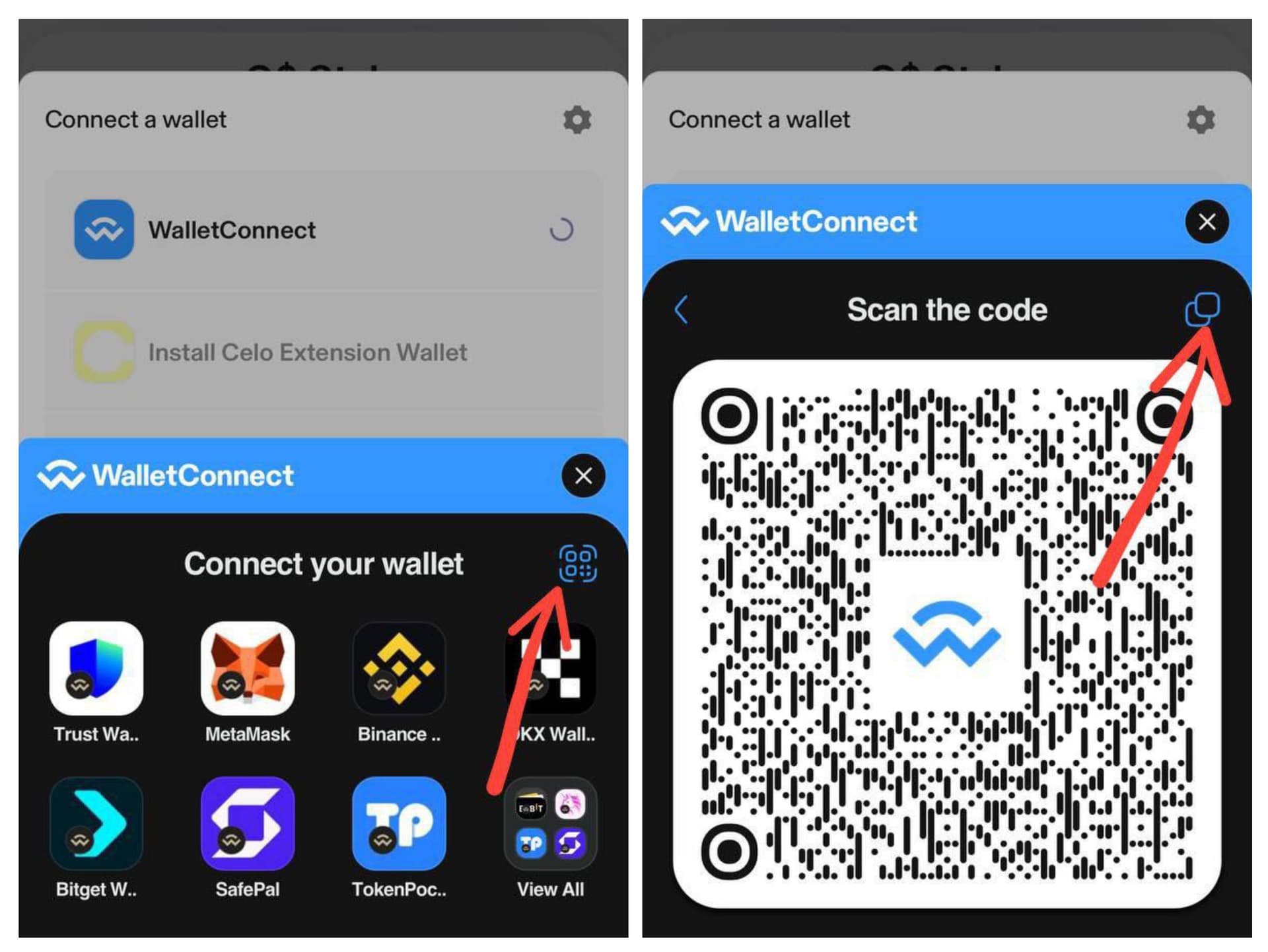
Step 4: Navigate to your GoodWallet, tap Walletconnect and Paste the QR link:

Step 5: Tap on Connect and Approve:

Step 6: Navigate to the GoodStaking site, Input the amount of G$ you want to stake and tap on Stake:

Final Step: Approve and Confirm you’ve successfully Staked your G$:

 Weekly G$ Staking Earnings
Use this table to estimate how much G$ you can earn weekly based on your staked amount at a 4.99% APR. Perfect for planning your passive income with GoodDollar staking.

Happy Earning!!!