Getting Started with GoodWallet
Follow these simple steps to set up your GoodWallet account and start claiming your daily G$ (GoodDollar) rewards.
Step 1: Navigate to GoodWallet
Go to the official GoodWallet platform:


Step 2: Create Your Account
-
Tap “Sign In / Sign Up”.
-
Choose your preferred sign-in method:
-
Continue with Google, or
-
Use Facebook, or
-
Sign in via OTP (One-Time Password) sent to your phone or email.
-
-
Follow the prompts to complete your account setup.
Once your account is created, you’ll be directed to your GoodWallet dashboard.
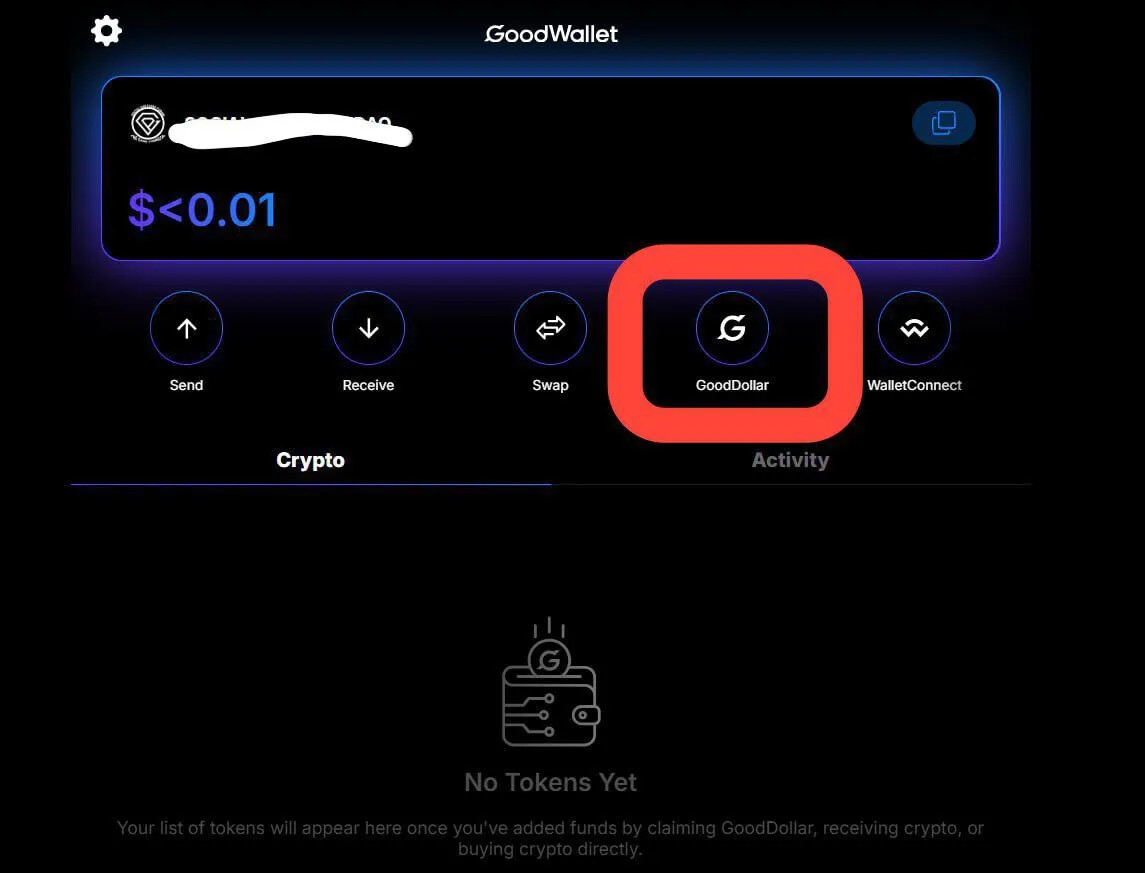
Step 3: Access the GoodDollar Section
-
On the dashboard, you’ll see several icons.
-
Tap on the GoodDollar (G$) icon — this will take you directly to the Claim Section, where you can begin your daily claim process.

Step 4: Whitelist Your Wallet
Before you can claim G$, your wallet must be whitelisted — this ensures your wallet is registered and eligible for daily basic income.
-
When prompted, tap “Verify”.
-
Follow the simple instructions on screen.
Step 5: Verify Your Identity
-
Begin the verification process.
-
This step confirms your identity through a quick face verification check — required to ensure each user is real and unique.
 See the “Tips for Face Verification” section to help you pass verification easily.
Step 6: Start Claiming G$
Once your verification is successful and your wallet is whitelisted:
-
Tap “Claim G$” each day to receive your basic income directly in your wallet.
-
You can view your balance, transactions, and claim history anytime in your dashboard.
Tips for a Smooth Start
 Bookmark the GoodWallet page for quick access.
Always ensure you’re using the official GoodWallet site or app.
Keep your sign-in method (Google, Facebook, or OTP) consistent — don’t switch between them.
Make sure your phone or browser is updated for best performance.